



Designed for Professionals
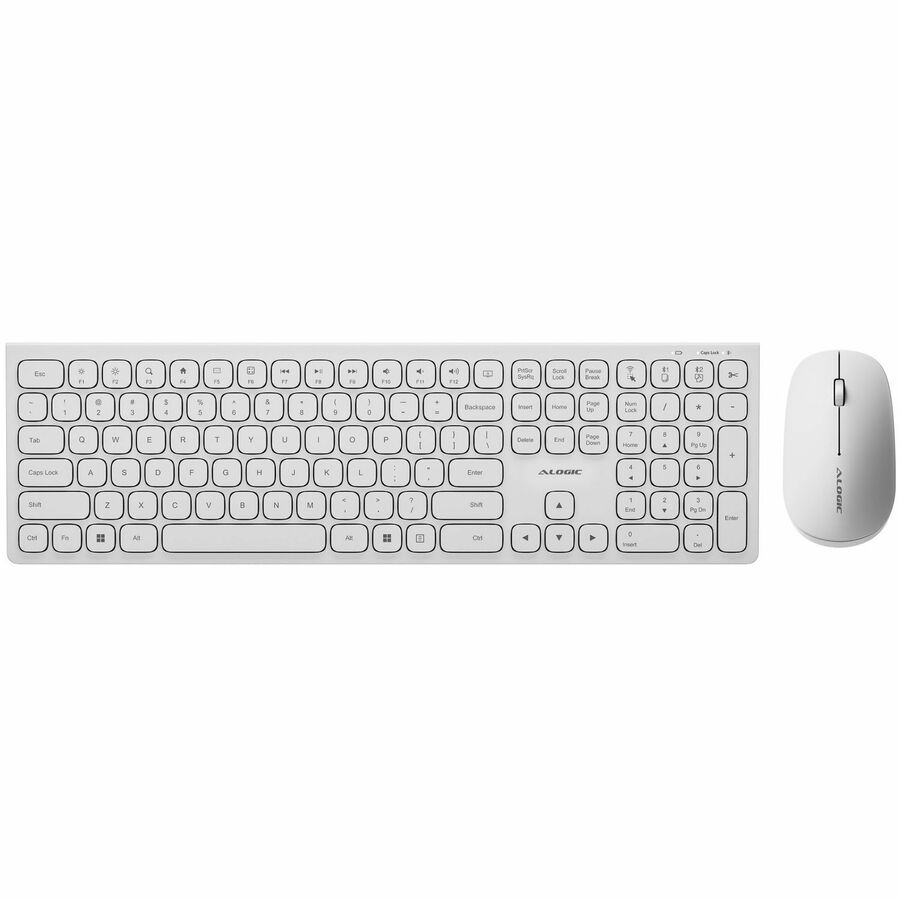
Despite its slim, lightweight design, we haven't compromised on the Echelon Keyboard's typing experienced, with full-size, comfortably spaced keys that make composing long documents quick and accurate.
Meanwhile, the compact Echelon Mouse's ergonomic chassis helps keep your hand cramp-free after a long day.
Designed for Windows Productivity
The Echelon keyboard features a number of custom shortcuts, such as single-key Cut, Copy and Paste keys above the Numpad for use when number crunching and OS shortcuts like Emails, Calculator and Search
Windows Shortcuts | 2.4GHz & Select All
Press to select all items in the current application.
Hold Fn and press to switch to Echelon's 2.4GHz connection.
Bluetooth 1 & Copy
Press to copy selected items.
Hold Fn and press to switch to saved Bluetooth device #1.
Hold Fn and this key to pair a new device in Echelon's Bluetooth #1 profile.
Bluetooth 2 & Paste
Press to copy selected items.
Hold Fn and press to switch to saved Bluetooth device #2.
Hold Fn and this key to pair a new device in Echelon's Bluetooth #2 profile.
Cut
Press to cut (copy then delete) the current items.
Decrease Brightness
Decreases the brightness of compatible displays.
Increase Brightness
Increases the brightness of compatible displays.
Search
Opens the Windows Search menu.
Home Shortcut
Opens web browser's home page.
Mail Shortcut
Opens system's default email application.
Calculator Shortcut
Opens the Windows Calculator app.
Previous Track
Restarts, or switches to the previously played media.
Play/Pause
Starts or stops the currently playing media.
Next Track
Skips to the next piece of media in your playlist.
Mute
Mutes the currently playing media.
Lower Volume
Lowers the system volume. Not supported by all audio devices.
Raise Volume
Increases the system volume. Not supported by all audio devices.
Lock Computer
Tap to lock your computer. Hold to power off.
Designed for the Modern Office
Perfect for hybrid work, the home office and hot desking, the Echelon Mouse and Keyboard can quickly switch between three connected devices at the touch of the button, including laptops, phones and tablets.
No Batteries Needed
Echelon features an integrated USB-C charging battery, which lasts weeks between charges, saving you the expense and hassle of swapping batteries in and out.
- USB-C Charging
- Battery Lasts Weeks
- Enjoy Bluetooth/RF wireless connection compatibility with most of the devices
- Keyboard & Mouse provides an affordable storage solution for your PC
| Brand | |
|---|---|
| Brand | Alogic |
| Power & Battery | |
|---|---|
| Charging Interface | USB Type C |
| Power Source | Battery |
| Networking & Connectivity | |
|---|---|
| Bluetooth Version | 5.0 |
| Input Devices | |
|---|---|
| Keyboard/Keypad Connectivity | Wireless |
| Pointing Device Connectivity | Wireless |
| Pointing Device Wireless Oper | 2.40 GHz |
| Keyboard/Keypad Wireless Oper | 2.40 GHz |
| Keyboard/Keypad Type | Keyboard |
| Keyboard/Keypad Wireless Technology | Bluetooth/RF |
| Keyboard/Keypad Features | Numeric Keypad |
| Hot Keys | Mute |
| Pointing Device Type | Mouse |
| Pointing Device Wireless Technology | Bluetooth/RF |
| Pointing Device Host Interface | USB Type A |
| Keyboard/Keypad Host Interface | USB Type A |
| Size / Dimensions | |
|---|---|
| Keyboard Form Factor | Full-size (100%) |
| Appearance | |
|---|---|
| Color | Not Specified |
| Keyboard/Keypad Color | White |
| Pointing Device Color | White |
| General Features | |
|---|---|
| Manufacturer | Alogic |
| Misc Ports | |
|---|---|
| Wireless Receiver Interface | USB Type A |
| Brand | Alogic |
| MPN | ASKBT3WCWH |
| Unit Count | 1 Units |
| Warranty | 2 Year |
| Return Policy | This product is eligible for 30-day returns. See our return policy for details. |