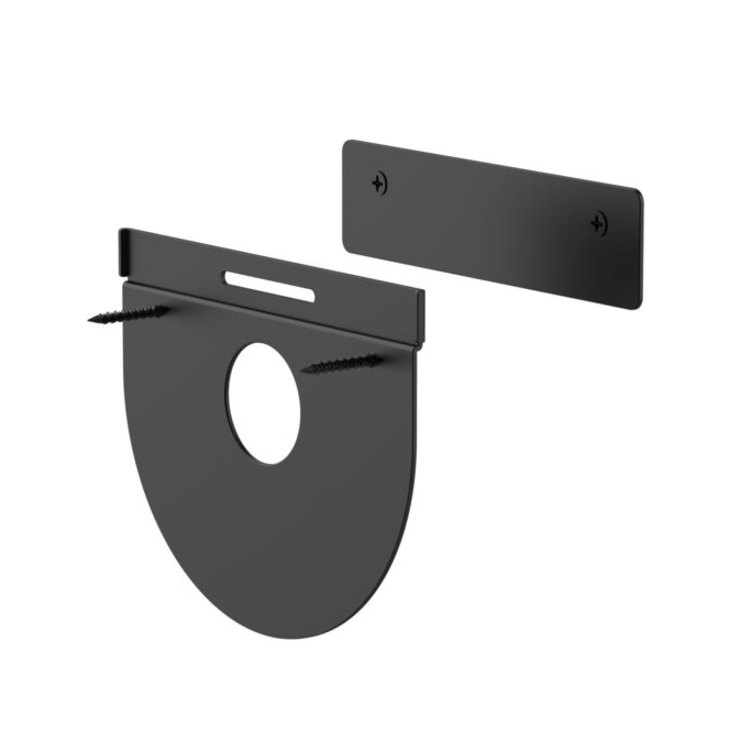




LOGITECH TAP WALL MOUNT
Designed to conserve table space in huddle rooms and for stand-up operation in hallways and open areas, the Logitech Tap Wall Mount offers convenient access to touch controls. A magnetic cable dock neatly holds an HDMI cable for wired content sharing.
MOUNTS FLUSH AND STAYS PUT
The sturdy plate and cleat construction holds the controller securely in place and adds virtually no thickness for a sleek appearance.
KEEP CABLES CLEAR
When using Tap with applications that support wired content sharing, a magnetic cable clip and dock keep an HDMI cable within reach but out of the way.
SUPPORTS IN-WALL CABLING
Compatible with the touch controller's rear and bottom cable exits so you can route cabling either within or down the wall.
- Makes it quick, convenient, and simple to adjust and reposition connectors in a modular mounting system
- Space Saving Design feature for better reliance and usability
- Wall application/usage for better dependability with added efficiency
| Brand | |
|---|---|
| Brand | Logitech |
| Size / Dimensions | |
|---|---|
| Maximum Height Adjustment (Above) | 2.28" |
| Appearance | |
|---|---|
| Color | Not Specified |
| General Features | |
|---|---|
| Manufacturer | Logitech |
| Brand | Logitech |
| UPC/GTIN | 097855147349 |
| MPN | 939-001817 |
| Unit Count | 1 Units |
| Warranty | 2 Year |
| Return Policy | This product is eligible for 30-day returns. See our return policy for details. |
| Customer Reviews | 5.0 (1) |
Alternative Products
Ratings
