



It's A Stretch With Conventional Keyboards
A conventional right-hand keyboard has navigation and numeric keys occupying valuable space on the right side.
When the character keys are centered in front of you in a proper typing position, you have to stretch out your arm to reach the mouse. Some users compensate for this problem by offsetting the keyboard to the left, which makes the typing position less comfortable.
R3K Reduces Reach To Your Mouse
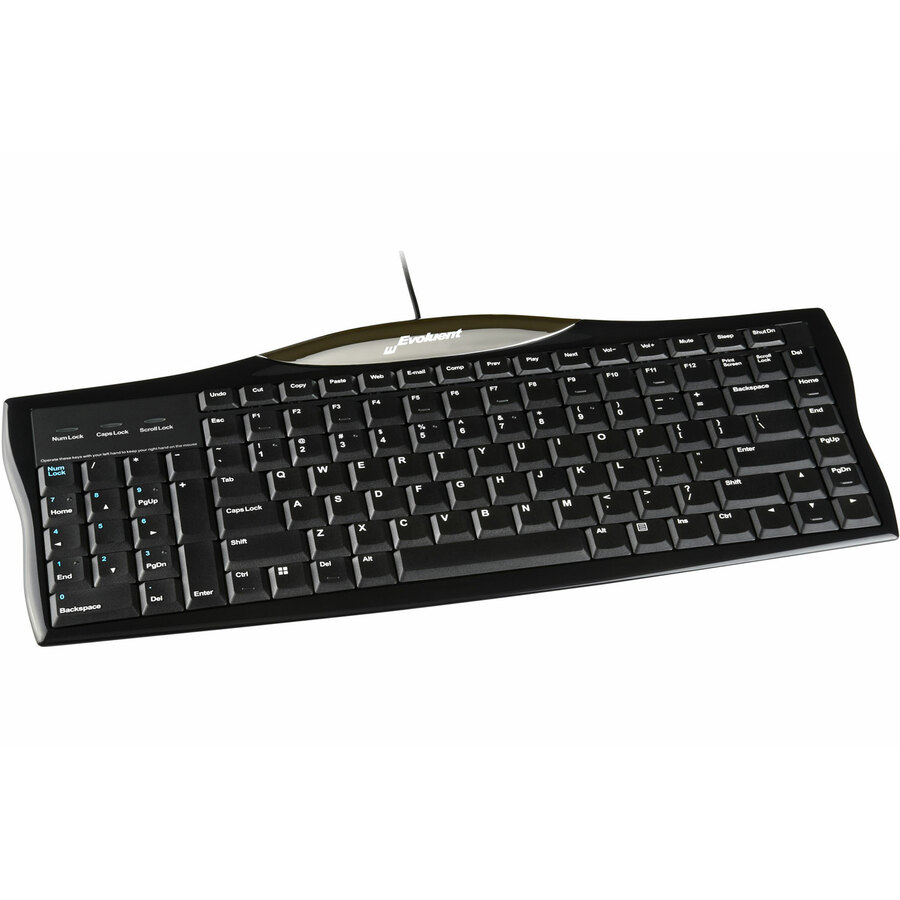
The Evoluent keyboard's numeric keypad is uniquely on the left side to let you put the mouse much closer.
Your reach to the mouse is greatly reduced for a more relaxed arm position.
R3K Reduces Reach To Your Keyboard
A conventional keyboard forces you to frequently move your right hand from the mouse to the keyboard to press Enter, Del, Page Up, Page Down, Backspace, Home and End.
Evoluent's keyboard has these often-used keys duplicated on both sides.
The left side navigation and numeric keys may be operated with your left hand to reduce reaching for them while using a right-hand mouse.
One-Touch Shortcut Keys
The shortcut keys on many keyboards, such as opening web browsers and email, are embedded in other keys. Accessing them requires simultaneously pressing Fn and the shortcut key with two hands.
The Evoluent keyboard has dedicated Windows shortcut keys that are accessed with one touch.
- High quality scissor key mechanisms with crisp action and no key cap wobble.
- Tactile bumps on often used keys such as Ctrl, Del, Home, Page Down, and down arrow to aid operation by touch.
- Full size arrows, Del, F keys, Ctrl, Alt, Page Up, Page Down, Home and End keys.
| Brand | |
|---|---|
| Brand | Evoluent |
| Power & Battery | |
|---|---|
| Power Source | USB |
| Input Devices | |
|---|---|
| Keyboard/Keypad Connectivity | Cable |
| Keyboard/Keypad Features | Numeric Keypad |
| Hot Keys | Shut Down |
| Keys Layout | QWERTY |
| Keyswitch Technology | Scissors |
| Keyboard/Keypad Host Interface | USB |
| Size / Dimensions | |
|---|---|
| Keyboard/Keypad Height | 0.80" |
| Keyboard/Keypad Width | 15.90" |
| Keyboard/Keypad Depth | 6.70" |
| Appearance | |
|---|---|
| Color | Not Specified |
| General Features | |
|---|---|
| Manufacturer | Evoluent, LLC |
| Brand | Evoluent, LLC |
| UPC/GTIN | 852153000181 |
| MPN | R3K |
| Unit Count | 1 Units |
| Return Policy | This product is eligible for 30-day returns. See our return policy for details. |