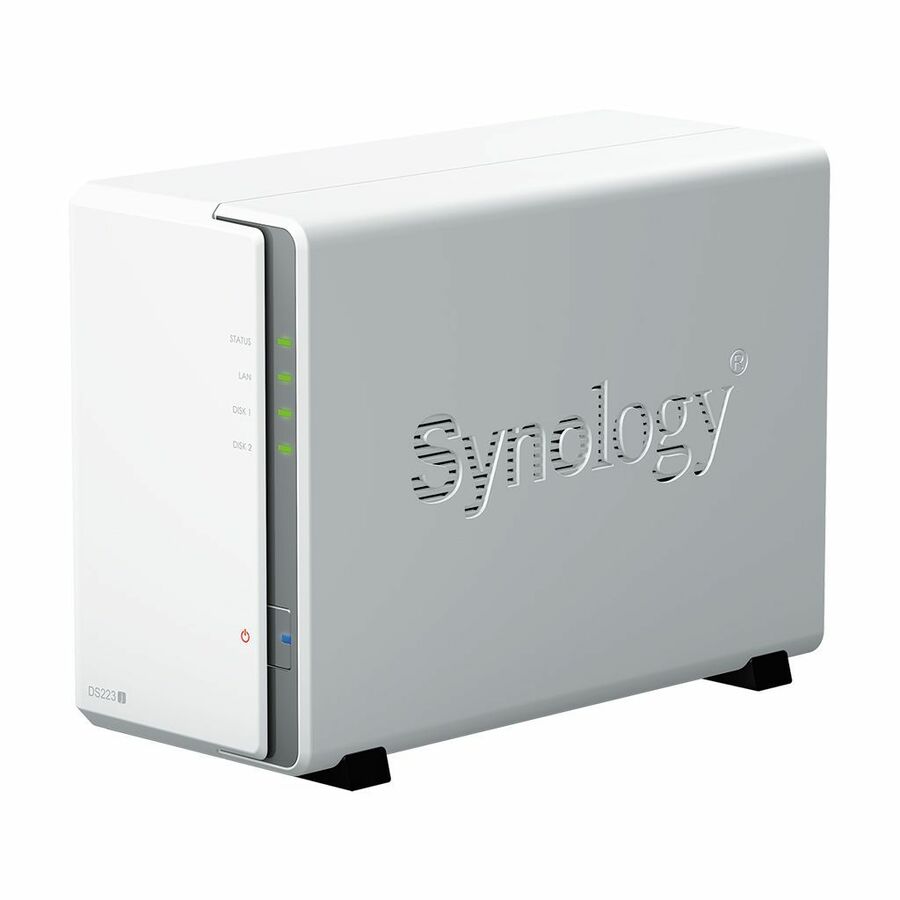




DiskStationDS223j | Compact, quiet, and energy-efficient storage All-in-one platform to organize your data Secure private cloud
Anywhere, anytime secure access to all your data.
Easy sharing and syncing
Safely access and share files and media from anywhere.
Hardware and software engineered to protect your data - trusted by millions.
Built for sharing
DS223j is designed for small teams to share, sync, and collaborate more efficiently.
Multi-platform file access
Manage your files and media from anywhere withSynology Drive. Available on PC, Mac, Linux, Chromebook, Android, iOS, or any device equipped with a browser.
Real-time collaboration
Stay productive while working in a team or with your clients. Work together across different platforms usingSynology Office.
Sync across sites
Keeping data synced between different sites has never been easier. Synology Drive ShareSync keeps files and folders synchronized across Synology systems.
Seamless synchronization to clouds
Sync files between your private cloud and public cloud storage platforms, including Google Drive, Dropbox, Microsoft OneDrive, and more withSynology Cloud Sync. Retain local copies of your cloud data to centralize management and achieve data ownership.
Your data in safe hands with Btrfs1The advanced Btrfs file system helps safeguard data against corruption through file self-healing and allows for the reversal of unintentional or malicious changes through fast snapshot technology.Learn more
Store, share, and protect
Configure your DS223j to manage all your documents, photos, and other files, or protect your physical assets with professional video surveillance.
Photo management | Manage your photo collection
Organize your photos and videos with smart and intuitive features. Browse automatically generated albums using facial recognition, geolocation, tags, and more.
Sharing made safer and easier
Securely share media with colleagues or clients while leveraging privacy-focused options for your peace of mind. Collaborate with selected users on a folder-based media library by creating a Shared Space.
Data protection | Automated media backup
Automatically upload photos and videos taken on your mobile device to your private cloud withSynology PhotosorSynology Drive.
Protection against cyberattacks
LeverageSynology Driveto protect data from ransomware attacks or accidental deletion with real-time or scheduled backup of your PC folders.
Video surveillance | Wide compatibility
Choose from over 8,300 IP cameras or ONVIF devices compatible withSynology Surveillance Stationto keep your premises secure.2
Universal access
Watch live camera streams through web browsers, desktop clients, or mobile apps. Get notified of events and take immediate action.
Add an extra layer of protection | Perform full Synology system backups
Back up your entire Synology device, including system settings and applications, or select specific folders. Transfer all backup data to multiple destinations usingHyper Backup.3
Keep your data safe with snapshots
Take your data protection to the next level by creating automatic point-in-time snapshots of shared folders that can be copied off-site and rapidly restored usingSnapshot Replication.
- SAN/NAS Storage System offers maximum storage efficiency and convenience
- Supports up to 2 drives; for flexible storage options
- Through RAID levels (0, 1, basic, hybrid raid, jbod), RAID provides data reliability, fault tolerance and improves overall performance
- DDR4 SDRAM memory technology for fast, easy, and convenient access and retrieval of data and information
- RAID technology - data reliability, fault tolerance and improved overall performance
- Desktop form factor for your convenience and simplicity of usage
- Featuring Gigabit Ethernet port for ultra-fast network speeds
- DiskStation Manager OS with all the creative and productive tools you need
| Brand | |
|---|---|
| Brand | Synology |
| CPU / Processor | |
|---|---|
| Processor Manufacturer | Realtek |
| Processor Model | RTD1619 |
| Number of Processors Installed | 1 |
| Processor Core | Quad-core (4 Core) |
| Processor Speed | 1.70 GHz |
| Memory / RAM | |
|---|---|
| Standard Memory | 1 GB |
| Memory Technology | DDR4 SDRAM |
| Storage | |
|---|---|
| RAID Levels | 0 , 1 , JBOD , Hybrid RAID , Basic |
| Number of Solid State Drive I | 0 |
| Number of Hard Drives Install | 0 |
| Number of Hard Drives Support | 2 |
| RAID Supported | Yes |
| Drive Interface | Serial ATA |
| Power & Battery | |
|---|---|
| Maximum Power Supply Wattage | 60 W |
| Networking & Connectivity | |
|---|---|
| Protocols | CalDAV |
| USB Ports | |
|---|---|
| Total Number of USB Ports | 2 |
| Number of USB 3.2 Gen 1 Ports | 2 |
| Ethernet Port | |
|---|---|
| Number of Network (RJ-45) Por | 1 |
| Network (RJ-45) | Yes |
| Size / Dimensions | |
|---|---|
| Form Factor | Desktop |
| General Features | |
|---|---|
| Controller Type | Serial ATA |
| Manufacturer | Synology, Inc |
| Drive Bays | |
|---|---|
| Number of Solid State Drive S | 2 |
| Number of Total Expansion Bays | 2 |
| Number of 2.5"/3.5" Bays | 2 |
| Miscellaneous | |
|---|---|
| Product Name | DiskStation DS223j SAN/NAS Storage System |