Skip to Content

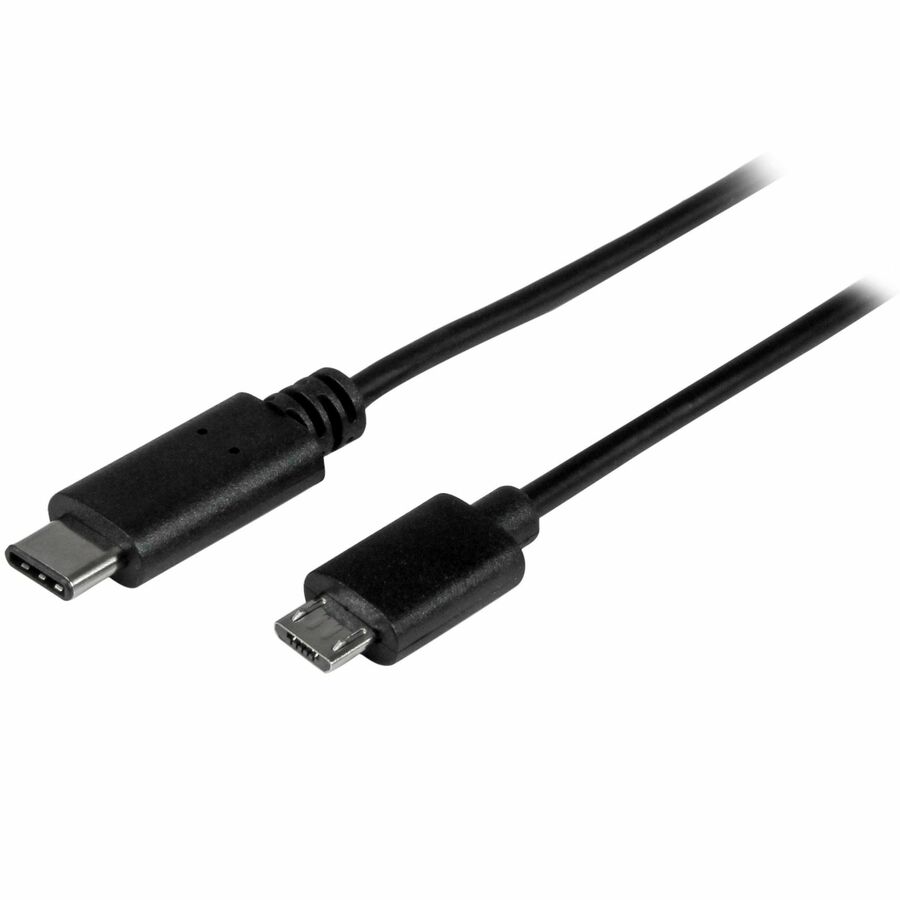
StarTech.com 0.5m USB C to Micro USB Cable - M/M - USB 2.0 - USB-C to Micro USB Charge Cable - USB 2.0 Type C to Micro B Cable - Charge and sync your USB 2.0 Micro-B devices from a USB-C host, with reduced clutter - 0.5m USB C to Micro USB Charge Cable M/M - 50cm USB 2.0 Type C to Micro B Cable - USB-C to Mico-B - 20" USB C Charging Cable - USB Type C Micro USB Cable

11.41 11.41
11.41

11.41 / Units
  • Brand
  • Connector on Second End Detai
  • Weight (Approximate)
  • Product Name
  • Marketing Information
  • Brand Name
  • Manufacturer Part Number
  • Features
  • Cable Length
  • Cable Type
  • Connector Type on First End
  • Connector on First End Details
  • Connector Gender on First End
  • Connector Type on Second End
  • Connector on Second End Details
  • Connector Gender on Second End
  • Connector Plating
  • Jacket Material
  • American Wire Gauge
  • Product Color
  • Color Family
  • Data Transfer Rate
  • Environmentally Friendly
  • Environmental Compliance
  • Packaged Quantity
  • Country of Origin
  • Limited Warranty
  • Manufacturer
  • Product Type
  • Device Supported
  • Manufacturer Website Address
This product is eligible for 30-day returns. See our return policy for details. Terms and Conditions
Shipping: 1-6 Business Days

This USB-C™ to Micro-B cable lets you charge and sync your USB 2.0 Micro-USB mobile device from a USB Type-C™ laptop, USB-C wall charger, car charger or power bank. The cable also lets you connect an external Micro-USB drive for easy data backups. Charge and sync your mobile devices while you're on the roadThis non-standard 0.5-meter cable is great for close-range connections to charge and sync your Micro-USB mobile devices with your laptop. You can also use the cable to charge your devices from a USB-C wall charger, car charger or power bank -- perfect for people on the move, for providing simple, tidy connections. Back up your data while you're in the fieldThe cable can also be used to back up data from your USB-C or Thunderbolt™3 computer to an external Micro-USB 2.0 drive. The short cable lets you set up in small offsite workspaces, or in a coffee shop or hotel room, so that you can install your equipment without excess cable getting in your way. Keep as a spare while you're travelingReplace the USB-C charging cable that came with your device, or keep one as a spare while you're traveling, so that all of your devices will be ready to use whenever you need them while you're on the road. The USB2CUB50CM from StarTech.com is backed by a lifetime warranty for guaranteed reliability. More from the Manufacturer

More from the Manufacturer
  • Thunderbolt 3 port compatible
  • Guaranteed reliability with our lifetime warranty
  • Simple connections through a reversible USB Type-C connector, which plugs into your device with either side facing up
Brand
Brand StarTech.com
General Features
Data Transfer Rate 480 Mbit/s
Manufacturer StarTech.com
Cables
Cable Length 1.64 ft
Cable Type USB
Connector Type on First End USB 2.0 Type C - Male
Connector on First End Details 1 x 24-pin USB 2.0 Type C - Male
Connector Gender on First End Male
Connector Type on Second End Micro USB 2.0 Type B - Male
Connector on Second End Details 1 x 5-pin Micro USB 2.0 Type B - Male
Connector Gender on Second End Male
Connector Plating Nickel
Jacket Material Polyvinyl Chloride (PVC)
American Wire Gauge 22/30 AWG
Compliance & Certification
Environmentally Friendly Yes
StarTech.com 0.5m USB C to Micro USB Cable - M/M - USB 2.0 - USB-C to Micro USB Charge Cable - USB 2.0 Type C to Micro B Cable - Charge and sync your USB 2.0 Micro-B devices from a USB-C host, with reduced clutter - 0.5m USB C to Micro USB Charge Cable M/M - 50cm USB 2.0 Type C to Micro B Cable - USB-C to Mico-B - 20" USB C Charging Cable - USB Type C Micro USB Cable

Ratings

Authentic Reviews powered by Bazaarvoice
5.0
1 Review

Customer reviews are powered by Bazaarvoice. Your browser or an extension is blocking it. To read reviews from verified buyers, please allow bazaarvoice.com in your ad blocker or privacy settings and refresh this page.