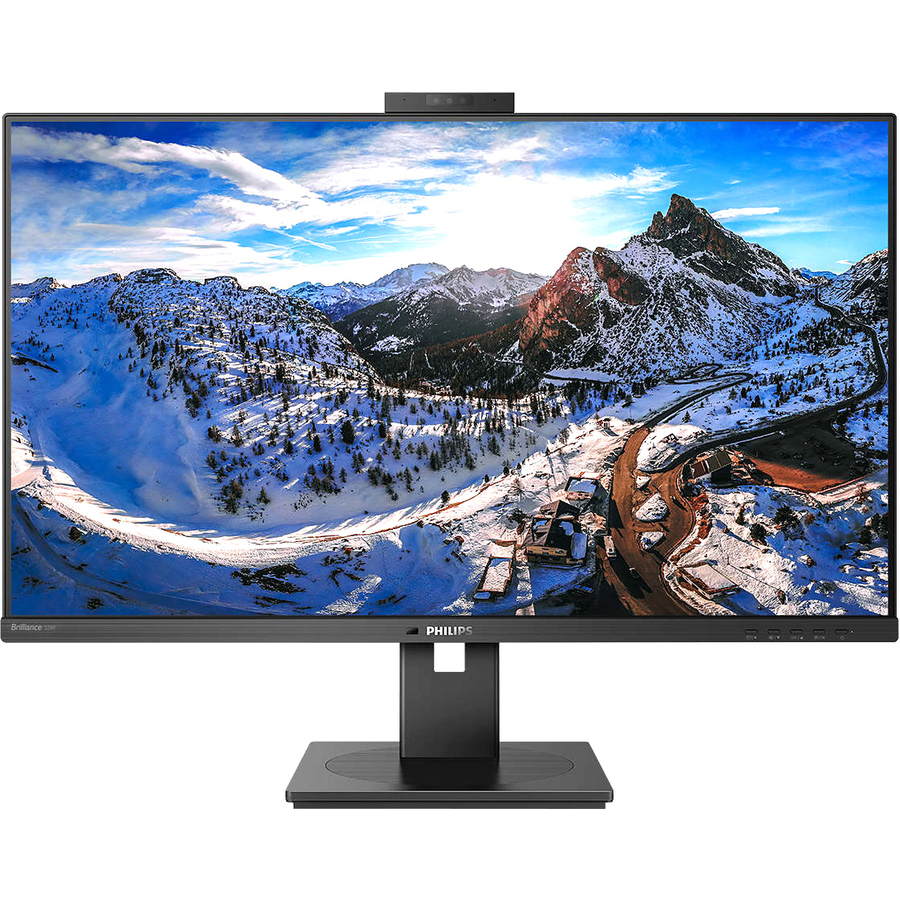
Master every task in a crisp view
- P Line
- 32 (31.5"/80 cm diag.)
- 3840 x 2160 (4K UHD)
USB-C enables laptop power charging directly from a monitor
This Philips display features a built-in USB type-C docking station with power delivery. With intelligent and flexible power management, you can power charge your compatible* laptop directly. Its slim, reversible USB-C connector allows for easy, one-cable docking. Simplify by connecting all your peripherals like keyboard, mouse and your RJ-45 Ethernet cable to the monitor's docking station. You can watch high-resolution video and transfer data at super-speed, while powering up and re-charging your notebook at the same time.
UltraClear 4K UHD (3840 x 2160) resolution for precision
These Philips displays utilise high-performance panels to deliver UltraClear, 4K UHD (3840 x 2160) resolution images. Whether you are a demanding professional requiring extremely detailed images for CAD solutions, a user of 3D graphics applications or a financial wizard working on huge spreadsheets, Philips displays will make your images and graphics come alive.
IPS technology for full colours and wide viewing angles
IPS displays use advanced technology that gives you extra-wide viewing angles of 178/178 degrees, making it possible to view the display from almost any angle - even in 90-degree Pivot mode! Unlike standard TN panels, IPS displays gives you remarkably crisp images with vivid colours, making it ideal not only for Photos, films and web browsing, but also for professional applications that demand colour accuracy and consistent brightness at all times.
Securely sign in with pop-up webcam with Windows Hello™
Philips' innovative and secure webcam pops up when you need it and securely tucks back into the monitor when you are not using it. The webcam is also equipped with advanced sensors for Windows Hello™ facial recognition, which conveniently logs you into your Windows devices in less than 2 seconds, 3 times faster than a password.
Less eye fatigue with Flicker-Free technology
Due to the way brightness is controlled on LED-backlit screens, some users experience flicker on their screen which causes eye fatigue. Philips Flicker-Free technology applies a new solution to regulate brightness and reduce flicker for more comfortable viewing.
LowBlue Mode for easy-on-the-eyes productivity
Studies have shown that just as ultra-violet rays can cause eye damage, shortwave-length blue light rays from LED displays can cause eye damage and affect vision over time. Developed for wellbeing, the Philips LowBlue Mode setting uses a smart software technology to reduce harmful shortwave blue light.
PowerSensor saves up to 80% energy costs
PowerSensor is a built-in 'people sensor' that transmits and receives harmless infrared signals to determine if the user is present and then automatically reduces monitor brightness when then user steps away from the desk, cutting energy costs by up to 80 percent and prolonging monitor life
LightSensor for the perfect brightness with minimal power
LightSensor uses a smart sensor to adjust the picture brightness depending on the light conditions in the room for the perfect picture with minimal power usage.
Built-in RJ-45 Ethernegives data securit
- 31.5" viewable screen size enhances clarity and depth for immersive playback of movies, games, and high-resolution media
- WLED backlight technology for enhanced visual clarity using uniform illumination to reduce shadows and improve on-screen detail
- 4 ms response time reduces motion blur and ghosting, delivering smooth frame transitions in high-speed gaming and video playback
- Adaptive Sync tearing prevention technology provides a distortion-free and reliable display by reducing screen tearing artifacts
- 16:9 widescreen layout enhances multitasking and visual depth, making it suitable for both creative workflows and media consumption
- Furnishes captivating visuals with 350 Nit brightness levels that deliver clear, vibrant images in both bright and dim settings
- SmartImage feature boosts monitor reliability and performance consistency for sustained productivity
- 3840 x 2160 maximum resolution delivers razor-sharp detail and stable image performance
- LCD monitor resists screen burn-in and delivers long-term clarity fo
| Brand | |
|---|---|
| Brand | Philips Electronics |
| GPU / Graphics | |
|---|---|
| HDCP Supported | Yes |
| Tearing Prevention Technology | Adaptive Sync |
| Number of Screens | 1 |
| Screen / Display | |
|---|---|
| Native Contrast Ratio | 000:1 , 1 |
| Dynamic Contrast Ratio | 000 , 000:1 , 50 |
| Screen Size Class | 32" |
| Viewable Screen Size | 31.5" |
| Backlight Technology | WLED |
| Horizontal Frequency | 30 kHz to 140 kHz |
| Vertical Frequency | 23 Hz to 75 Hz |
| Maximum Resolution | 3840 x 2160 |
| Screen Mode | 4K UHD |
| Aspect Ratio | 16:9 |
| Panel Technology | In-plane Switching (IPS) Technology |
| Brightness | 350 Nit |
| Response Time | 4 ms |
| Standard Refresh Rate | 75 Hz |
| Color Gamut | 89% Adobe RGB |
| Color Supported | 1.07 Billion Colors |
| Horizontal Viewing Angle | 178° |
| Vertical Viewing Angle | 178° |
| Pixel Pitch | 0.18159 mm x 0.18159 mm |
| Native Resolution | 3840 x 2160 |
| Response Time Details | 4 ms GTG |
| Power & Battery | |
|---|---|
| Standby Power Consumption | 300 mW |
| Operating Power Consumption | 31.80 W |
| USB Ports | |
|---|---|
| Total Number of USB Type-C Po | 1 |
| USB | Yes |
| Number of USB Ports | 5 |
| USB Type-C | Yes |
| HDMI Ports | |
|---|---|
| HDMI | Yes |
| Number of HDMI Inputs | 2 |
| DisplayPort | |
|---|---|
| DisplayPort | Yes |
| Number of DisplayPorts | 1 |
| Ethernet Port | |
|---|---|
| Network (RJ-45) | Yes |
| Camera / Webcam | |
|---|---|
| Webcam | Yes |
| Audio | |
|---|---|
| Speakers | Yes |
| Number of Speakers | 2 |
| Size / Dimensions | |
|---|---|
| Weight with Stand (Approximat | 26.90 lb |
| Height with Stand | 25.55" |
| Depth with Stand | 11.02" |
| Width with Stand | 28.11" |
| VESA Mount Compatible | Yes |
| VESA Mount Standard | 100 x 100 |
| Mount Type | Desk Mountable |
| Appearance | |
|---|---|
| Adjustable Stand | Yes |
| Stand Adjustments | Tilt |
| Security | |
|---|---|
| Windows Hello Compatible | Yes |
| General Features | |
|---|---|
| Built-in Devices | USB Hub |
| Manufacturer | Philips Electronics |
| Compliance & Certification | |
|---|---|
| Energy Efficiency Certificati | ENERGY STAR 8.0 |
| Energy Star | Yes |
| Environmentally Friendly | Yes |
| Environmental Certification | TCO Certified Edge |
| TCO Certified | Yes |
Alternative Products
Ratings
