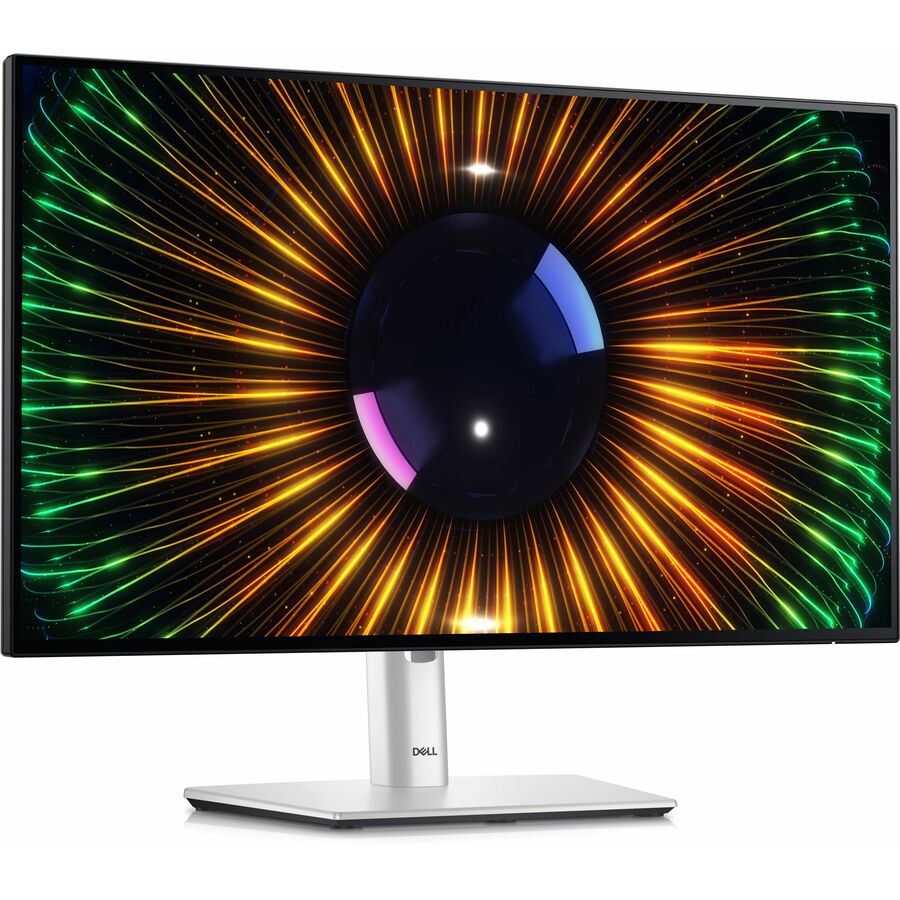




Features & Design | World's first 4-star certified monitor for eye comfort
Experience a new level of comfort and productivity.
Unparalleled visual comfort | Ambient Light Sensor: A built-in Ambient Light Sensor intelligently optimizes brightness and color temperature based on your surroundings.
Improved ComfortView Plus: Reduces harmful blue light emissions to ≤35%, for all-day comfort without sacrificing color accuracy.
A smoother visual experience: A 120Hz refresh rate delivers less flicker, more seamless scrolling and smoother motion than 60Hz monitors.
Work vibrantly | Vivid color: Enjoy 1.07 billion colors and a wide color coverage across industry standards, including 85% DCI-P3, 100% sRGB and 100% BT.709. Get color calibration accuracy of Delta E < 2 (average) (sRGB, BT.709).
Connect to productivity | Extend your connectivity: Connect to more with DisplayPort 1.4, HDMI (HDCP 1.4)(supports up to FHD 1920 x 1080 120Hz TMDS as specified in HDMI 1.4), USB-A and USB-C ports that provide speeds of up to 10Gbps.
Connect with ease: Simply plug in accessories and devices with a quick-access USB-A port and a USB-C port that delivers up to 15W of power.
Designed for comfort | Fit your work style: Tilt, swivel, pivot and adjust the height of your monitor to work your way.
Stay focused on your work: Our infinity edge screen provides a virtually borderless experience.
Work beautifully: A premium platinum silver finish enhances any workspace.
Green thinking for today and tomorrow | Environmental standards: This monitor uses 85% PCR (post-consumer recyclable) plastic and 90% recycled aluminum in the design. It meets the latest environmental standards such as EnergyStar® and TCO Certified Edge and is EPEAT® Gold registered.
Eco-conscious packaging: Dell monitors ship in boxes made with 100% renewable content that is also 100% recyclable.
Energy conservation: Save energy with PowerNap, a feature that dims or puts your monitor to sleep when not in use.
Works with devices on macOS®
Tested with devices on macOS, this monitor is ready-to-work with Mac® devices. Requires USB-C or HDMI connectivity. Daisy chaining multiple displays via a single cable requires Thunderbolt connectivity. Please check your device for compatibility, as select M-series chips may not support some features. Install Dell Display and Peripheral Manager application to customize advance settings.
Dell Display and Peripheral Manager
Experience Dell's singular, innovative application to optimize the performance of your entire Dell PC workspace.
Maximize productivity
Easy Arrange tiles apps across screens with pre-set partitions and customizes up to five windows, enhancing multitasking. Easy Arrange Memory saves and restores app profiles manually, on schedule, or at start-up.
Easy navigation
Control and work across multiple network or USB connected PCs and monitors with a single keyboard and mouse, seamlessly transferring files between them.
More manageable
Save time and boost IT efficiency with the Dell Device Management Console to manage your Dell peripheral fleet at scale, from a single cloud-based console. Discover expanded Command Line Interface features from Dell Display and Peripheral Manager.
- 23.8" viewable screen size enhances clarity and depth for immersive playback of movies, games, and high-resolution media
- Designed with LED edgelight, supports uniform backlighting and compact design, helping simplify deployment in embedded applications
- Flat panel display delivers crisp visuals with lifelike colors and smooth grayscale for better viewing across tasks
- 5 ms response time enhances responsiveness and visual sharpness, ideal for action-packed games, sports, and dynamic media
- Designed to meet Eye Comfort standards, helps reduce eye fatigue and discomfort, supporting wellness in daily screen exposure
- Certified 4 Star Eye Comfort, minimizes harmful emissions and visual stress, helping protect eyes during extended screen use
- 16:9 widescreen layout enhances multitasking and visual depth, making it suitable for both creative workflows and media consumption
- Furnishes captivating visuals with 250 Nit brightness levels that deliver clear, vibrant images in both bright and dim settings
- Anti-glare led monitor
| Brand | |
|---|---|
| Brand | Dell Technologies |
| GPU / Graphics | |
|---|---|
| HDCP Supported | Yes |
| Number of Screens | 1 |
| Screen / Display | |
|---|---|
| Native Contrast Ratio | 000:1 , 1 |
| Maximum Preset Resolution | 1920 x 1080 at 120 Hz |
| Surface Treatment | Anti-glare |
| High Dynamic Range (HDR) Ready | No |
| Calibration Accuracy | Delta E < 2 (average) |
| Screen Size Class | 24" |
| Viewable Screen Size | 23.8" |
| Backlight Technology | LED Edgelight System |
| Maximum Resolution | 1920 x 1080 |
| Display Screen Type | Flat Panel |
| Screen Mode | Full HD |
| Aspect Ratio | 16:9 |
| Panel Technology | In-plane Switching (IPS) Technology |
| Brightness | 250 Nit |
| Response Time | 5 ms |
| Standard Refresh Rate | 120 Hz |
| Color Gamut | 85% DCI-P3 |
| Color Supported | 16.7 Million Colors |
| Horizontal Viewing Angle | 178° |
| Vertical Viewing Angle | 178° |
| Pixel Pitch | 0.27450 mm x 0.27450 mm |
| Pixel Per Inch (PPI) | 92.53 |
| Active Display Area (H x V) | 20.70" x 11.60" |
| Response Time Details | 5 ms Fast |
| Power & Battery | |
|---|---|
| Input Voltage Range/Current D | 100 VAC to 240 VAC / 50 Hz or 60 Hz ± 3 Hz / 1.5 A (typical) |
| Input Voltage Range | 100V AC to 240V AC |
| Input Voltage | 230 V AC |
| Standby Power Consumption | 500 mW |
| Off-Mode Power Consumption | 300 mW |
| Maximum Power Consumption | 72 W |
| Operating Power Consumption | 13.70 W |
| USB Ports | |
|---|---|
| Total Number of USB Type-C Po | 2 |
| USB | Yes |
| Number of USB Ports | 5 |
| USB Type-C | Yes |
| HDMI Ports | |
|---|---|
| Number of HDMI 1.4 Ports | 1 |
| Number of HDMI 1.4 (HDCP 1.4) | 1 |
| HDMI | Yes |
| Total Number of HDMI Ports | 1 |
| Number of HDMI Inputs | 1 |
| DisplayPort | |
|---|---|
| Number of DisplayPort 1.4 Por | 1 |
| Number of DisplayPort 1.4 (HD | 1 |
| DisplayPort | Yes |
| DisplayPort Output | Yes |
| Number of DisplayPorts | 2 |
| DisplayPort Version | 1.4 |
| Ethernet Port | |
|---|---|
| Network (RJ-45) | Yes |
| Audio Ports | |
|---|---|
| Number of Audio Line Out Ports | 1 |
| Audio Line Out | Yes |
| Audio | |
|---|---|
| Speakers | No |
| Software & Licensing | |
|---|---|
| Dell Display and Peripheral M | Yes |
| Size / Dimensions | |
|---|---|
| Weight with Stand (Approximat | 11.86 lb |
| Height with Stand | 19.55" |
| Extended Height with Stand | 19.55" |
| Compressed Height with Stand | 14.33" |
| Depth with Stand | 7.16" |
| Width with Stand | 21.21" |
| VESA Mount Compatible | Yes |
| VESA Mount Standard | 100 x 100 |
| Mount Type | Panel Mount |
| Maximum Adjustable Height | 5.91" |
| Tilt Angle | -5° to 21° |
| Appearance | |
|---|---|
| Adjustable Stand | Yes |
| Stand Adjustments | Tilt |
| Glass Hardness | 3H |
| General Features | |
|---|---|
| Swivel Angle | -45° to 45° |
| Pivot Angle | +/-90° |
| Built-in Devices | USB Hub |
| Frequency | 60 Hz |
| Manufacturer | Dell Technologies |
| Compliance & Certification | |
|---|---|
| Non-operating Temperature Ran | -4°F (-20°C) to 140°F (60°C) |
| Operating Temperature Range | 32°F (0°C) to 104°F (40°C) |
| Operating Humidity Range | 10% to 80% (Non-condensing) |
| Non-operating Humidity Range | 5% to 90% (Non-condensing) |
| Maximum Operating Altitude | 16404 ft |
| Maximum Non-operating Altitude | 40000 ft |
| Energy Star | Yes |
| Environmentally Friendly | Yes |
| Environmental Certification | TCO Certified Edge |
| TCO Certified | Yes |
| Eye Comfort Certification | Yes |
| Eye Comfort Rating | 4 Star |
| Packaging & Origin | |
|---|---|
| Stand Included | Yes |