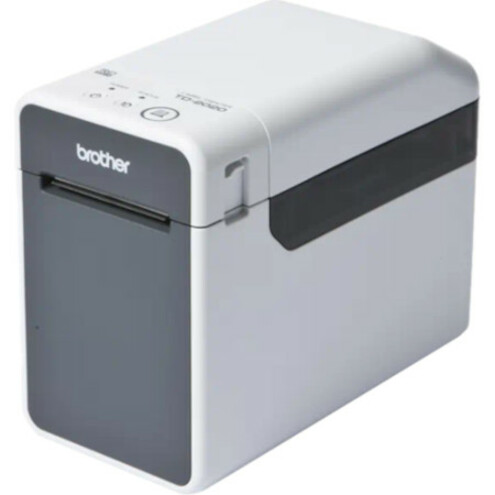




With standard USB and network capability, the compact TD-2125N lets you share your printer between multiple PCs and mobile devices and manage it remotely. Print labels, tags, and receipts up to 2.4 inches with ease. Discover self-contained printing with an optional touch-panel keyboard. And increase efficiency even further by adding an optional peeler that removes the backing for you. It's a versatile, affordable labeling solution that delivers the quality you need.
- Print labels, receipts, and tags up to 2.4 inches wide at up to 6 inches per second print speed to increase efficiency
- 203dpi thermal print resolution for reliable quality
- Connect easily with Ethernet, USB 2.0 and RS-232C Serial interfaces
- Windows® and Android™ compatibility
- Increase ease of use with an optional peeler or print without using a PC by adding an optional keyboard and screen for standalone printing capabilities
- Easily change media rolls with capacity up to 5 inch in diameter with drop-in spindle-less design
- Create professional labels with the included P-touch Editor label design software application
- Get the confidence of a 2-year Premier Limited Warranty
| Brand | |
|---|---|
| Brand | Brother Industries |
| Power & Battery | |
|---|---|
| Power Source | AC |
| Networking & Connectivity | |
|---|---|
| Ethernet | Yes |
| Network Ready | Yes |
| Connectivity Technology | Wired |
| USB Ports | |
|---|---|
| USB | Yes |
| General Features | |
|---|---|
| Manufacturer | Brother Industries, Ltd |
| Recommended Use | Label/Receipt Print |
| Misc Ports | |
|---|---|
| Serial Port | Yes |
| Printer/Scanner/Fax Specs | |
|---|---|
| Print Technology | Direct Thermal |
| Maximum Mono Print Speed | 6 in/s |
| Print Color Capability | Monochrome |
| Media Type | Tag |
| Maximum Roll Diameter | 5" |
| Maximum Print Resolution (dpi) | 203 |
| Maximum Print Width | 2.40" |
| Packaging & Origin | |
|---|---|
| Power Adapter Included | Yes |
| Cables Included | USB |
Alternative Products
Your Dynamic Snippet will be displayed here...
This message is displayed because youy did not provide both a filter and a template to use.