

Stream and Transition in a Snap
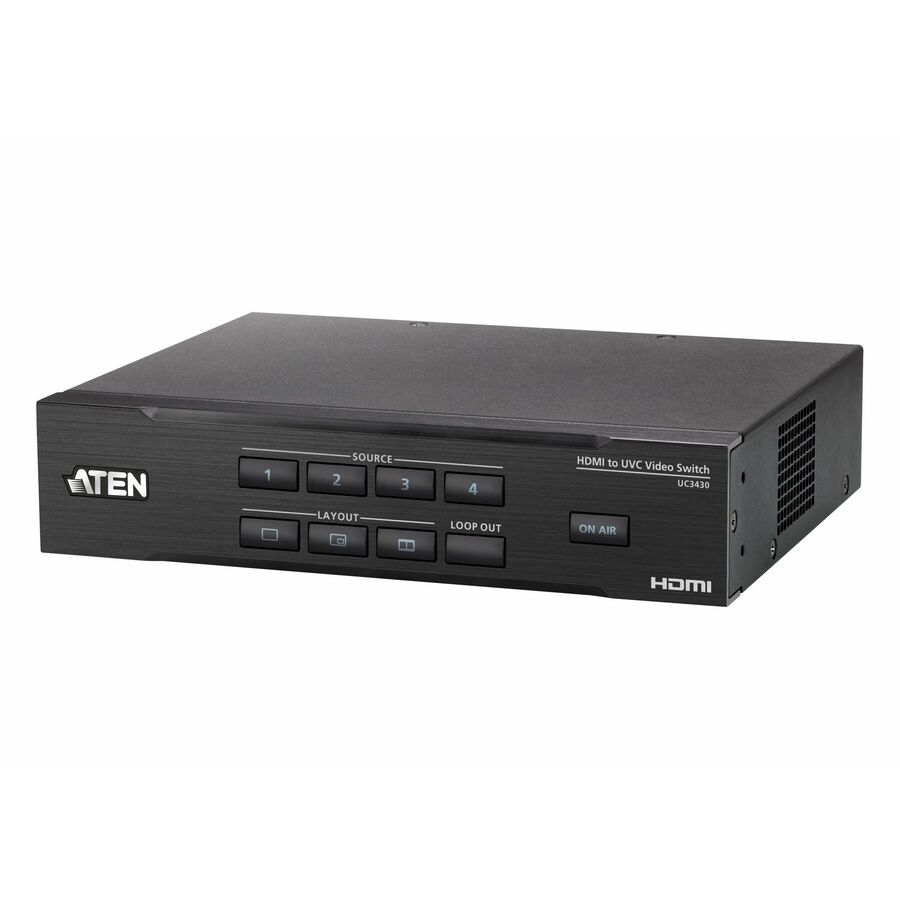
The CAMLIVE™ PRO 4K 4-Input HDMI to USB Video Switcher captures up to four 4K@60 HDMI inputs, allowing users to blend dual video signals into a single stream. It supports various output options, including 4K@60 HDMI PGM/Loop-through for multi-view screen purposes and 4K@30 USB-C output for live broadcasting on the Internet.
Recommended Usage Scenarios
The CAMLIVE™ PRO 4K can be used in scenarios requiring multiple HDMI input sources. Connecting multiple cameras allows you to effortlessly switch recording sources, capturing every exciting moment. You can also connect different visual sources such as laptops, desktops, and gaming consoles to overlap with the camera feed, creating various live streaming effects. The 6.35mm audio jack enables seamless integration with professional audio equipment, delivering the best visual and auditory experience.
Meeting with Multiple Input Sources
In medium to large meeting rooms, two cameras, and two different presentation sources, such as PowerPoint slides and videos, are often used. As the CAMLIVE™ PRO 4K supports 4 HDMI sources, it can optimize the capacity of these sources and seamlessly incorporates both presentation content and important participants into the video during the meeting, avoiding awkward gaps caused by switching.
Live Lecture
The CAMLIVE™ PRO 4K allows large conference rooms to stream professional grade content to global employees and stakeholders through video software. The intuitive front panel control makes it easy for you to quickly switch between multiple HDMI cameras and presentations on laptops. Produce professional content without the need to hire professionals.
Versatile Deployment in Diverse Applications
The CAMLIVE™ PRO 4K serves as an invaluable asset in streaming high quality content through its advanced video processing capabilities. Its versatility is highlighted by its capacity to be deployed in the following diverse applications.
Stream in Style, Unleashing Epic Live Experiences
Quickly complete your program with on-site production and simultaneously reach a global audience through the CAMLIVE™ PRO 4K. Its built-in hardware streaming engine works seamlessly with various software, enabling direct live streaming to multiple social media platforms. With 4 HDMI inputs, capture diverse angles and switch content in real-time. Connect a computer for presentations for important meetings on Zoom and Teams. Livestream effortlessly on platforms like YouTube, Twitch, and Facebook.
- Captures 4 channels of 4K @ 60 HDMI, mixes and switches the streams while providing audio mixer functionalities and seamless transition for pro-level broadcasting
- Multiple output options:
- HDMI PGM / Loop-through at 4K @ 60 for preview and monitoring purposes
- USB-C output 4K @ 30 for live broadcast on the Internet
- Versatile control methods via the front panel pushbuttons, RJ-45 port for serial control via ATEN VK Control System, and ATEN OnAir Lite app
- ATEN OnAir Lite app - users can remotely control device settings in real-time, including multiple AV source switching / mixing, content cropping / resizing, layout options (full screen / PiP / PbP / PoP), transitions, Chroma Key, and logo adding
| Brand | |
|---|---|
| Brand | ATEN Technology |
| GPU / Graphics | |
|---|---|
| Number of Displays Supported | 4 |
| Graphics Modes | 4K |
| Networking & Connectivity | |
|---|---|
| Connectivity Technology | Cable |
| USB Ports | |
|---|---|
| USB | Yes |
| Number of USB Ports | 1 |
| HDMI Ports | |
|---|---|
| HDMI Out | Yes |
| HDMI In | Yes |
| Number of HDMI Outputs | 2 |
| Number of HDMI Inputs | 4 |
| Ethernet Port | |
|---|---|
| Number of Connectivity (RJ-45 | 1 |
| Connectivity (RJ-45) | Yes |
| Camera / Webcam | |
|---|---|
| Maximum Video Resolution | 4096 x 2160 |
| General Features | |
|---|---|
| Manufacturer | ATEN Technology, Inc |
| Printer/Scanner/Fax Specs | |
|---|---|
| Scan Format | 1080p |