



Turn every screen into a communication tool
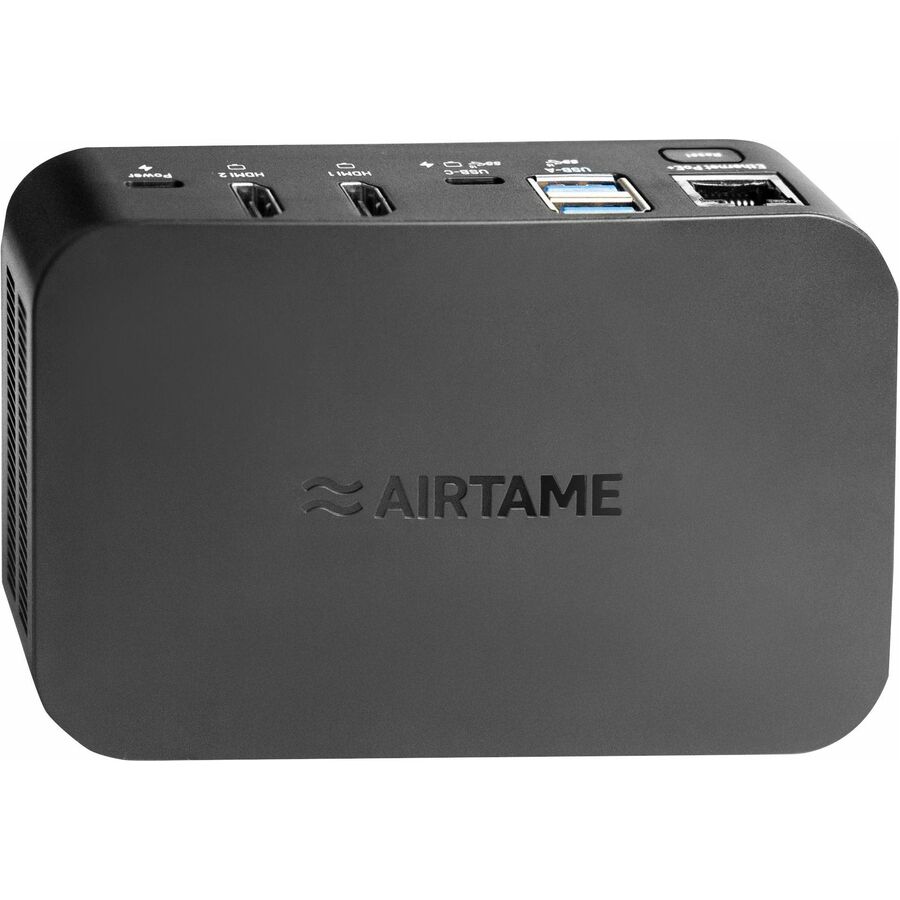
Airtame 3 makes it easy to share your screen, show relevant signage content, and run video meetings - without switching systems or plugging in cables. The Airtame device connects to any display via HDMI and supports a wide range of cameras, microphones, and speakers over USB. Built for shared spaces, Airtame 3 works with the tools your team already uses: Microsoft Teams, Zoom, Google Meet, and Webex. You can join calls directly from your calendar, share your screen without joining the meeting, and manage everything remotely through Airtame Cloud.
Screen sharing
Screen share from any device, Laptop, tablet, or phone
Share browser tab, window, or whole screen
Share directly from the browser without an app
Native protocols (Miracast, AirPlay, Google Cast)
Video and Audio sharing
Video conferencing
Supports calls across Microsoft Teams, Google Meet, Zoom, and Webex
Plug n play peripheral support
Join upcoming meetings from a Google or Microsoft calendar
Easily screen share from another device into a call
Cast the call from a browser without an app
Digital signage
Make playlists of 3rd party signage content
Integrations to Google Slides, PowerPoint, Canva, Power BI, and many more
Customize the home screen with meeting room status and instructions for sharing
Schedule content to appear at certain times
Support vertical aspect ratios
Remote management
Access Airtame screens from anywhere in the world
Schedule power management and automatic firmware updates
Troubleshoot signage using live view of the screen
Organize Airtame screens in groups
Receive device alert when devices go offline
Emergency Alerts
Interrupt screens sharing and video calls with emergency alerts
Supported with APIs for easy integration to CAP and custom setups
Already wor ks with Raptop, CrisisGo, InformaCast, Omnilert, and more
Show custom All clear messages when the emergency is over
Trigger using Airtame Cloud
- Efficiently decodes audio video signals from the input device and sends them to the receiver to enable the display
- 3840 x 2160 maximum video resolution for a spectacular, sharp display with added reliability
- HDMI out enables you to transfer data from your devices to display receiver with added efficiency
- Connect your display receiver to your PC to supply power and conveniently transfer the photos and videos for editing and sharing on the social media
- Enjoy detailed wireless audio with these AT-DG3-HYBRID-3Y display receiver
- 2 output devices supported to better accommodate your specific requirements
- 4K graphics mode for an immersive and sharp viewing experience
- Offers a reliable, convenient way of communication and connectivity
- Display Receiver enables high-definition video transmission display for a productive, smooth, and interrupted video conferencing camera output
- Display Receiver allows quick retrieval of data files with maximum efficiency
| Brand | |
|---|---|
| Brand | Airtame |
| GPU / Graphics | |
|---|---|
| Graphics Modes | 4K |
| Networking & Connectivity | |
|---|---|
| Wireless LAN | Yes |
| Power over Ethernet (PoE) | Yes |
| Connectivity Technology | Wireless |
| Network Band | Tri Band |
| USB Ports | |
|---|---|
| USB | Yes |
| Number of USB Ports | 4 |
| HDMI Ports | |
|---|---|
| HDMI Out | Yes |
| Number of HDMI Outputs | 2 |
| Ethernet Port | |
|---|---|
| Number of Network (RJ-45) Por | 1 |
| Network (RJ-45) | Yes |
| Camera / Webcam | |
|---|---|
| Maximum Video Resolution | 3840 x 2160 |
| Size / Dimensions | |
|---|---|
| Receiver Width | 5.12" |
| Receiver Weight (Approximate) | 11.82 oz |
| Receiver Height | 1.44" |
| Receiver Depth | 3.35" |
| General Features | |
|---|---|
| Number of Output Devices Supp | 2 |
| Manufacturer | Airtame |