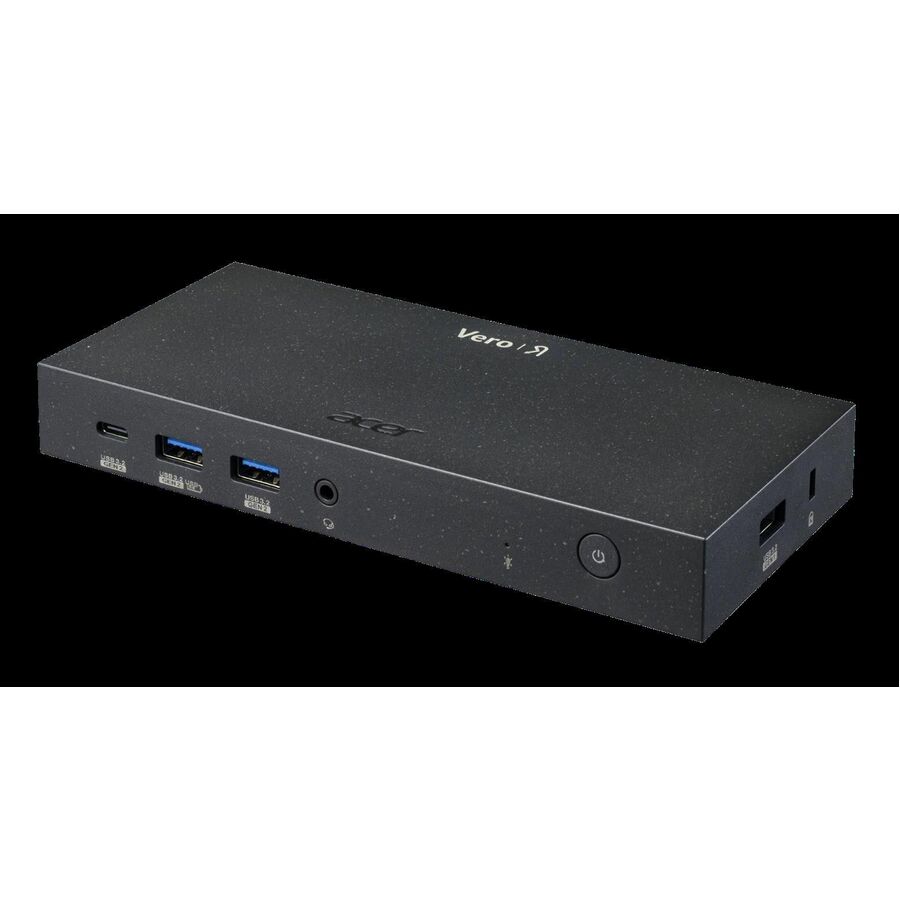




The Acer Vero MST Dock M33 allows you to extend the capabilities of your notebook by connecting it to multiple monitors and peripherals. It also could charge your notebook at the same time.
- Wired connectivity technology provides a high-powered and dependable connection
- Charging capability provides a safer and more convenient charging experience
- USB 3.1 Type C host interface allows powerful and efficient transfer of data with maximum productivity
- Docking Station provides a trouble-free charging solution with reliable, feasible connectivity for your notebook
- Power Delivery Pass-through feature for better reliance and usability
- Lets you conveniently connect to the gigabit ethernet Ethernet technology to offer maximum productivity
- Power Adapter power source type for your docking station provides maximum energy feasibility and added surveillance productivity
- HDMI effectively and conveniently transmits both audio and video signals with one single cable to ensure hassle-free connectivity
- 5 USB ports allows powerful and efficient transfer of data with maximum productivity
- 1 Network (RJ-45) Ports conveniently allows system integration and network installers to organize powered devices in locations that
| Brand | |
|---|---|
| Brand | Acer |
| GPU / Graphics | |
|---|---|
| Number of Displays Supported | 3 |
| Screen / Display | |
|---|---|
| Screen Mode Supported | HD+ |
| Supported Resolutions | 1600 x 900 |
| Power & Battery | |
|---|---|
| Charging Capability | Yes |
| Maximum Power Supply Wattage | 130 W |
| Power Source Type | Power Adapter |
| Networking & Connectivity | |
|---|---|
| Connectivity Technology | Wired |
| USB Ports | |
|---|---|
| Number of USB 3.2 Gen 1 Type- | 1 |
| Number of USB 3.1 Gen 1 Type- | 1 |
| Number of USB 3.2 Gen 2 Type- | 2 |
| USB Power Delivery | 100W |
| Total Number of USB Ports | 5 |
| USB Type-C | Yes |
| Number of USB Type-C Ports | 2 |
| USB Type-A | Yes |
| Number of USB Type-A Ports | 4 |
| HDMI Ports | |
|---|---|
| HDMI | Yes |
| Number of HDMI Ports | 1 |
| DisplayPort | |
|---|---|
| DisplayPort | Yes |
| Number of DisplayPorts | 2 |
| Ethernet Port | |
|---|---|
| Network (RJ-45) | Yes |
| Number of Network (RJ-45) Ports | 1 |
| Number of RJ-45 Ports | 1 |
| Audio Ports | |
|---|---|
| Headphone/Microphone Combo Port | Yes |
| Size / Dimensions | |
|---|---|
| Maximum Height Adjustment (Above) | 0.98" |
| Appearance | |
|---|---|
| Color | Black |
| Security | |
|---|---|
| Security Slot Type | Kensington Security Slot |
| Kensington Security Slot | Yes |
| General Features | |
|---|---|
| Management Features | Wake-on-Dock Button |
| Manufacturer | Acer, Inc |
| Misc Ports | |
|---|---|
| Host Interface | USB 3.1 Type C |
| Packaging & Origin | |
|---|---|
| Package Type | Retail |
| Brand | Acer, Inc |
| UPC/GTIN | 195133207591 |
| MPN | GP.DCK11.01D |
| Unit Count | 1 Units |
| Return Policy | This product is eligible for 30-day returns. See our return policy for details. |
Alternative Products
Your Dynamic Snippet will be displayed here...
This message is displayed because youy did not provide both a filter and a template to use.