

The graphing calculator that makes math problems no problem | Familiar notation, better understanding
The unique MathPrint™ feature enables proper notation and clearer formatting, letting students enter expressions, symbols and fractions exactly as they appear on their assignments and exams.
Visualize more with split-screen mode
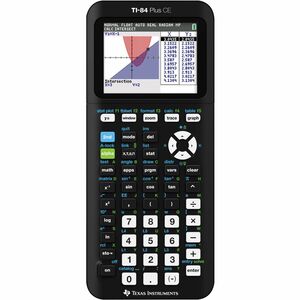
Use split-screen mode to view equations, graphs, and tables simultaneously. Teach students ways to see connections between expressions, numerical data, and graphical representations, making complex concepts easier to understand.
Turn abstract equations into real visuals
Use customizable styles, colors, and shading options to graph functions, parametric equations, and even polar relationships.
Put concepts in real-world context
Overlay graphs and equations on top of real images - even ones you upload yourself - to help students connect math and science concepts to the world around them.
Distraction-free learning
Your math class deserves better than a web browser. The TI-84 Plus CE unplugs students from the web and social media, so teachers can keep them focused on math.
Solve problems in style
Brighten up math class with a color that's uniquely you.
Your calculator, your curriculum
expand learning for every math and science student
Graphing and Visualization Features
Expand graphing capabilities with built-in apps that help students visual and explore mathematical concepts.
Inequality Graphing
Graph inequalities, display intersections and unions in distinct colors, and use calculation functions to find, trace, and store coordinate pair intersections between linear programming constraints.
Transformation Graphing
Observe how changes to coefficients affect the graphs of functions in real time. This interactive feature makes transformations of functions visually dynamic and easier to understand.
Conic Graphing
Present equations in function, parametric, or polar form and let students easily graph the four conical shapes - circle, ellipse, hyperbola and parabola.
Cabri™ Jr. App
Add a new dimension to student learning with interactive geometry for the calculator. Construct, analyze and transform mathematical models and geometric diagrams.
Algebra and Finance Solvers
Explore built-in features designed to help students solve equations, explore polynomials, and analyze models.
Polynomial Root Finder
Quickly find roots for polynomials up to the 10th degree, displayed as fractions, decimals, or in complex format for higher-degree equations. Easily store polynomials to Y= to graph and analyze.
Simultaneous Equation Solver
Solve systems of equations with up to 10 equations and 10 unknowns. Display solutions as unique, infinite, or no solution, with options to store coefficient matrices, augmented matrices, and Reduced Row Echelon forms for further exploration.
Numeric Solver
Enter an equation with one unknown, and the calculator will find the value that makes it true - no need to rearrange anything by hand. The Numeric Solver is a helpful tool for solving algebra problems and double-checking work.
- Full-color display Color-coordinate various graphs and values to boost visual learning.
- Rechargeable battery Built to last through class time, study time, and exam day.
- 30% slimmer design Built slimmer and lighter than the TI-84 Plus for more comfort in your hands.
| Brand | |
|---|---|
| Brand | Texas Instruments |
| Memory / RAM | |
|---|---|
| Memory Capacity | 149 KB |
| Memory Type | RAM |
| Screen / Display | |
|---|---|
| Display Screen Size | 2.80" |
| Display Resolution | 320 x 240 |
| Number of Display Digits | 10 |
| Power & Battery | |
|---|---|
| Battery Rechargeable | Yes |
| Power Source | Battery |
| USB Ports | |
|---|---|
| USB | Yes |
| Software & Licensing | |
|---|---|
| Calculator Functions | Amortization |
| Calculator Features | Built-in Memory |
| General Features | |
|---|---|
| Manufacturer | Texas Instruments, Inc |